Free
$0
Every week, forever
- 50 AI runs every week, up to 5 per 5 hours
- All free tools, unlimited
- Triage on failed messages
- No card needed
Just sign in with Google.
For SAP Integration Suite
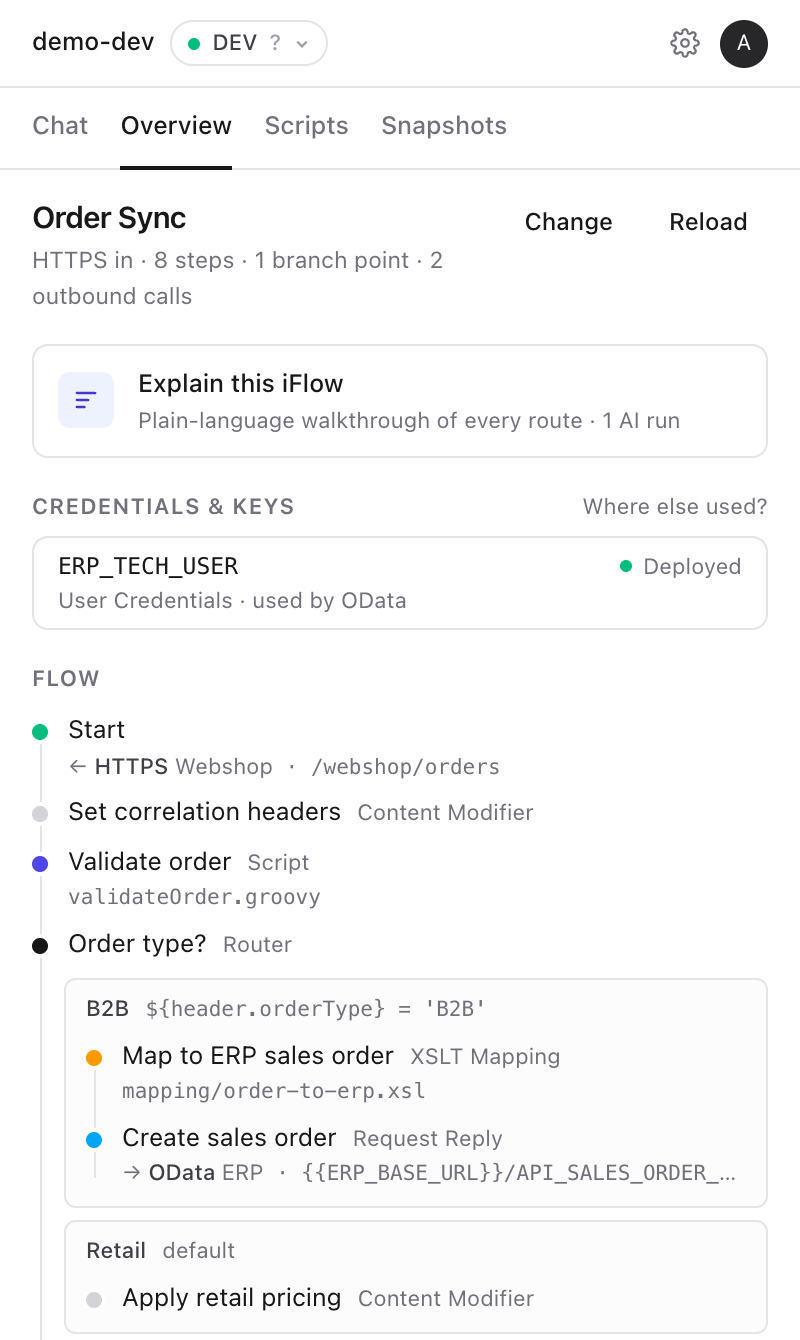
iGlow is an AI side panel for SAP Cloud Integration. Describe an integration flow and it builds it in your integration package. Ask for a Content Modifier, a Router or a Groovy script and it adds them. It tests with simulation, traces messages step by step, and fixes failed messages. You approve every save and deploy. Undo is one click.
50 free AI runs every week with Google sign-in. No tenant setup. Works in Chrome and Microsoft Edge.
How it works
The whole life of an iFlow, in one panel. iGlow works inside your browser tab, with the session you already have. Nothing to install on the tenant.
Describe the integration flow in chat: the sender, the system to call, the steps. iGlow plans it in your integration package and shows you the steps and the Groovy script first. Nothing is created until you click Create.
Ask for a Content Modifier, a Router with its conditions, a Groovy script, an adapter or an exception subprocess. You see every change before it is saved. iGlow then runs the same Problems and design guideline checks as SAP's editor.
iGlow runs SAP's simulation over the steps and routes it changed, with mocked receivers, so no external system is called. In the Test tab, send a message to a deployed iFlow's endpoint, starting from a sample body.
Open a message in Monitor and click Walk through. See each step it took, how long each one took, and where it failed. With log level Trace, also see the body, headers and properties at each step, and what changed.
Hints right on SAP's pages, with no AI: a heat map of failures on the iFlow canvas, the Timer schedule in plain words with runs that did not happen, waiting and failed messages in JMS queues, and failure counts on a package's Artifacts tab.
Also in the panel: externalize hard-coded addresses and credential names into externalized parameters in one go, create a message mapping from two XSD files, and document an iFlow as a Word file.
Fix failed messages
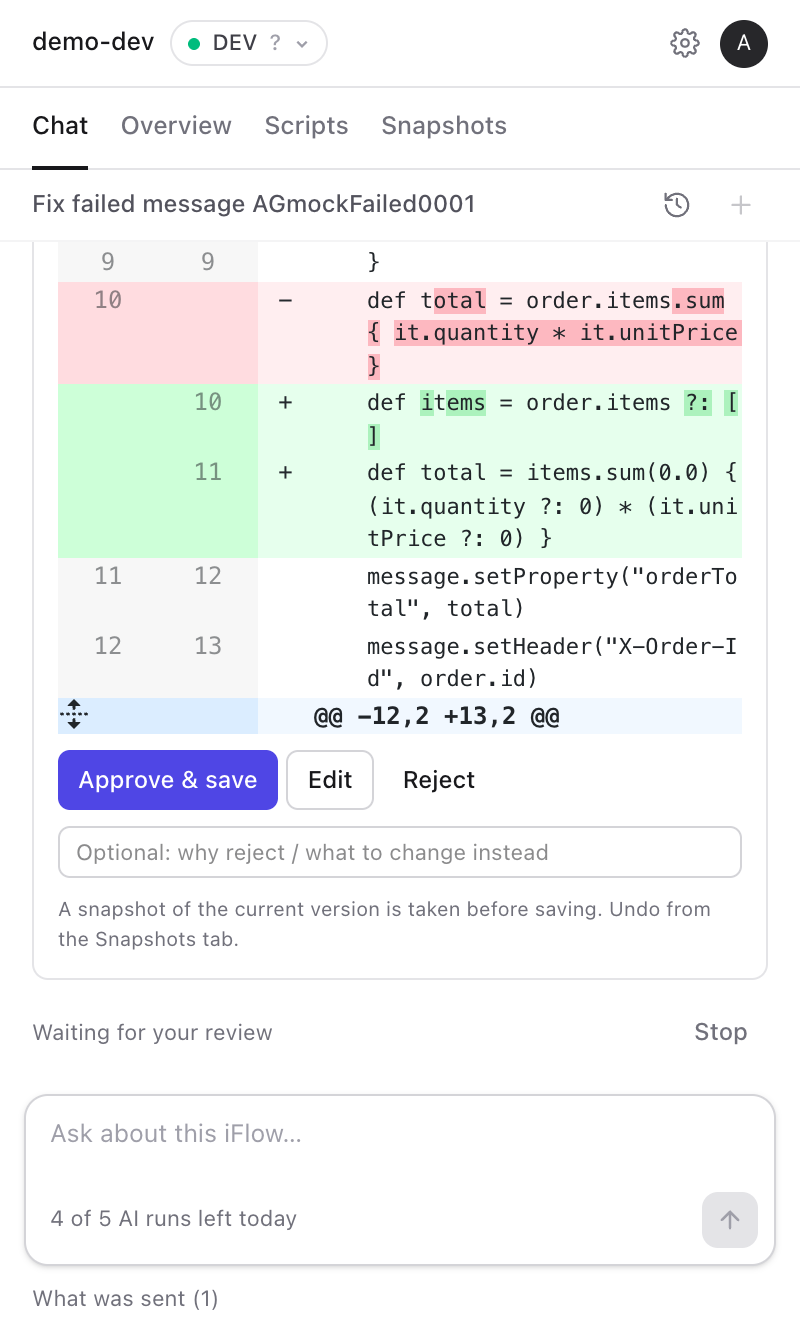
Pick a failed message and click Fix. iGlow reads the error, the failing step, the script and the trace, and explains the root cause. It only proposes a change when the fix belongs in a script or mapping.
The side panel
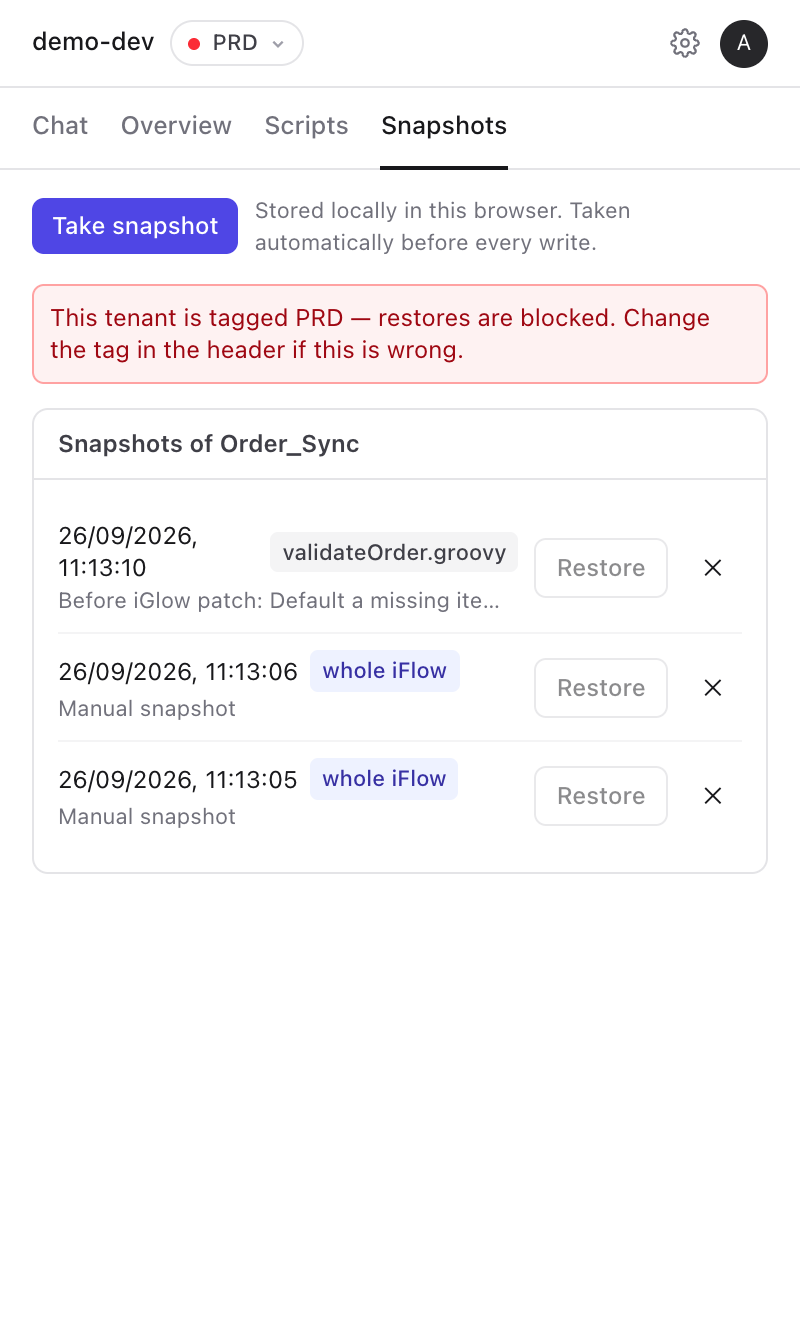
These are real screenshots of the panel, using a demo iFlow.
Features
These rules cover every write, not just fixes: a new iFlow, a change to its steps, a script fix, a parameter, a mapping, a deploy.
Every failed message gets a label like Script error or Receiver rejected call, before you open it.
Every create, save, deploy and restore needs your click. You see the steps, routes and scripts first, and can reject or ask for something else.
Before iGlow changes an iFlow, script, parameter or mapping, it takes a snapshot. Every restore takes one too. Stored in your browser.
Tag tenants DEV, QA or PRD. On a tenant tagged PRD, iGlow never creates, changes or deploys an iFlow.
Tenant calls run inside your own tab. Your SAP cookies never leave the browser.
Emails, phone numbers, card and IBAN numbers and tokens are masked first. Every request is viewable.
Free and unlimited, with no AI involved: iFlow summary, dependencies, script and XSLT browser with diff, snapshots, security-material search, externalizing parameters, the message walk-through and the hints on SAP's pages.
Pricing
An AI run is one request, from question to answer, including every step iGlow takes. The free tools never count.
$0
Every week, forever
Just sign in with Google.
$20/month
For developers who fix daily
Subscribe from the extension after signing in.
$100/month
For heavy, sustained use
Subscribe from the extension after signing in.
$18/user/month
For integration teams
Talk to us to set up a team.
Prices in USD, excluding taxes. Regional pricing for India. Weekly runs reset every Monday at 00:00 IST. A 5-hour window starts with your first run and resets 5 hours later.
FAQ
Only your SAP Integration Suite tab. iGlow calls the tenant from inside that tab with the session you're already signed in with, so there are no technical users, no API keys and nothing to install on the tenant. Your SAP cookies never leave the browser.
Only what the chat needs for your request, such as the iFlow's steps and settings, a script, an error text or a short trace excerpt. When the Chat tab lists failed messages, their error texts are sent to label the likely cause. Emails, phone numbers, card and IBAN-like numbers, tokens and authorization headers are masked in your browser first, and the panel shows exactly what was sent. The free tools send nothing. Privacy policy.
Nothing is created, saved or deployed without your click. Before iGlow changes an iFlow, it takes a snapshot, so Undo can restore the previous version. Changes are saved to design time first, and nothing is deployed until you confirm. iFlows on a tenant tagged PRD are never changed.
One request, from your question to the answer, including every step iGlow takes in between. A run that fails partway can be retried once for free. Summaries, diffs, snapshots, search and triage don't use runs.
SAP Integration Suite and Cloud Integration tenants on Cloud Foundry, including trial tenants. It works in Chrome and Microsoft Edge. In Edge, install it from the Chrome Web Store: Edge asks once to allow extensions from other stores.
Yes, both can be installed at the same time. iGlow uses its own side panel. On SAP's pages it only adds small hints, like the failure heat map and the Timer schedule, and you can turn them off in Settings.
Google Gemini, through iGlow's backend hosted in Frankfurt. Prompts and tenant content are not logged by default.
Yes. You keep your plan until the end of the period you've paid for, and the free weekly runs and free tools never stop.
Install, sign in with Google, and get 50 free AI runs every week. The free tools are unlimited.
Add to Chrome, it's freeFree to install. Works in Chrome and Microsoft Edge.